相机 Camera
观察者视角, 在视锥内的场景会被渲染到画布上
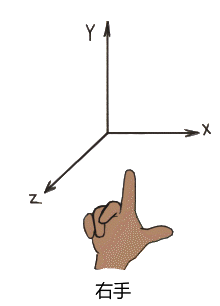
threejs 使用的是右手坐标系, 右手握空心拳,手指方向就是从x轴到y轴的方向,而z轴则垂直于手指弯曲的方向
1. 正交相机 OrthographicCamera
在这种投影模式下,无论物体距离相机距离远或者近,在最终渲染的图片中物体的大小都保持不变(没有近大远小)。
非常适合渲染2D场景或者UI元素。
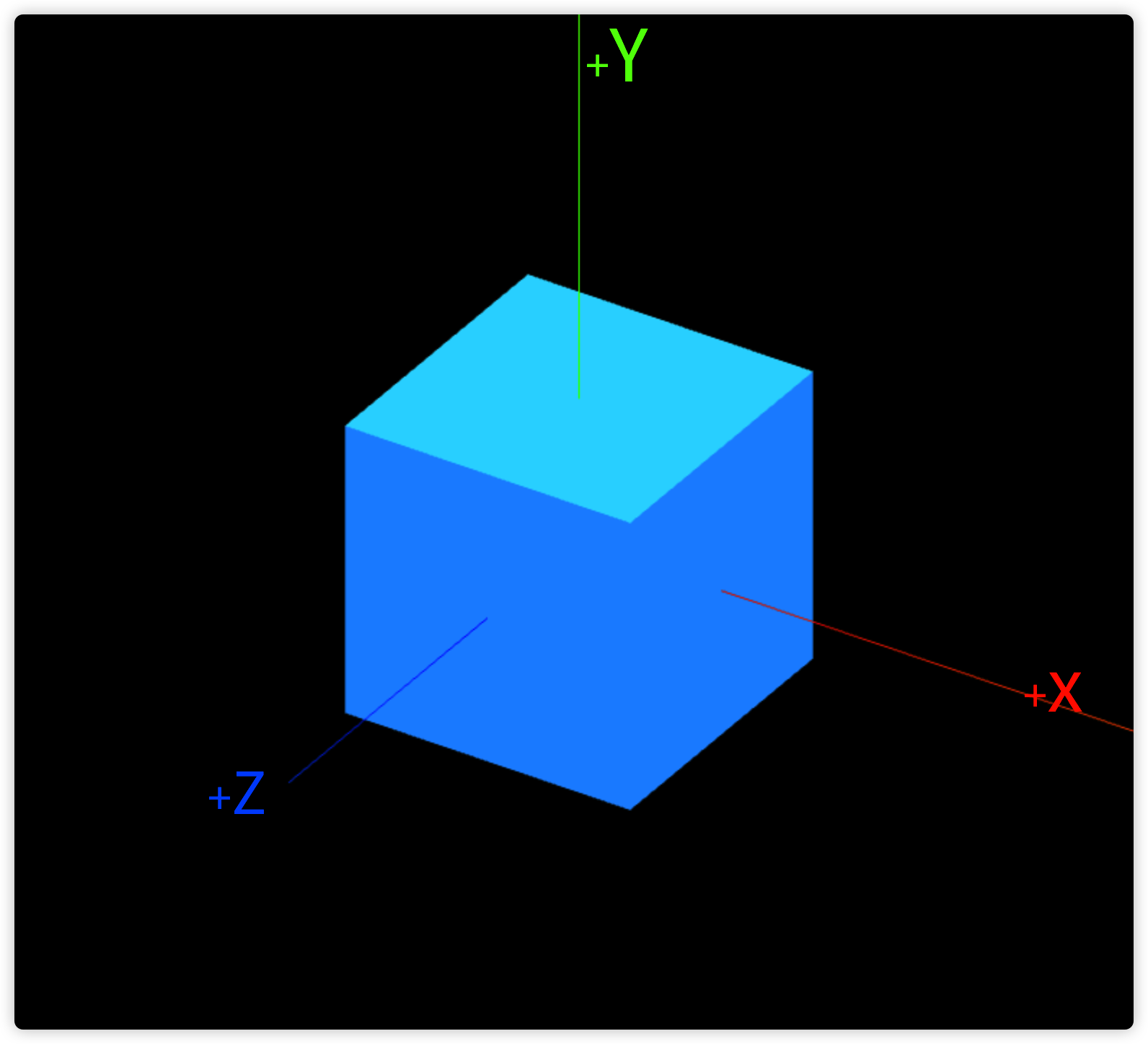 正交相机
正交相机
1-1. 创建正交相机
Demo2-0
const camera = new THREE.OrthographicCamera(left, right, top, bottom, near, far);

camera.position.set(1, 0.5, 2);1-2. 代码优化及画布纵横比
Demo2-1
const $ = {
  init () {
    this.createScene();
    this.createLights();
    this.createObjects();
    this.helpers();
    this.createCamera();
    this.render();
    this.controls();
    this.tick();
    this.fitView();
  },
  createScene () {
    const canvas = document.getElementById('c');
    const width = window.innerWidth;
    const height = window.innerHeight;
    // 创建3D场景
    const scene = new THREE.Scene();

    this.canvas = canvas;
    this.width = width;
    this.height = height;
    this.scene = scene;
  },
  createLights () {
    const { scene } = this;
    // 添加全局光照
    const ambientLight = new THREE.AmbientLight(0xffffff);
    // 添加方向光
    const directionalLight = new THREE.DirectionalLight(0xffffff, 0.5);

    scene.add(ambientLight);
    scene.add(directionalLight);
  },
  createObjects () {
    const { scene } = this;
    // 创建立方体
    const geometry = new THREE.BoxGeometry(2, 2, 2);

    // 设置立方体表面颜色
    /* const material = new THREE.MeshLambertMaterial({
      color: '#1890ff',
    }); */
    let faces = [];

    for (let i = 0; i < geometry.groups.length; i++) {
      // 重新生成新的材质
      const material = new THREE.MeshBasicMaterial({
        color: new THREE.Color(Math.random() * 0x00ffff),
      });

      faces.push(material);
    }

    // 生成物体对象
    const mesh = new THREE.Mesh(geometry, faces);

    scene.add(mesh);
    this.mesh = mesh;
  },
  helpers () {
    // 辅助坐标系
    const axesHelper = new THREE.AxesHelper(4);

    this.scene.add(axesHelper);

    // 添加网格平面
    const gridHelper = new THREE.GridHelper(100, 10, 0xcd37aa, 0x4a4a4a);

    this.scene.add(gridHelper);
  },
  createCamera () {
    const { scene } = this;

    // 创建观察场景的相机
    const size = 4;
    const camera = new THREE.OrthographicCamera(-size, size, size / 2, -size / 2, 0.001, 100); // 正交相机

    // 设置相机位置
    camera.position.set(1, 0.5, 2); // 相机默认的坐标是在(0,0,0);
    // 设置相机方向
    camera.lookAt(scene.position); // 将相机朝向场景
    // 将相机添加到场景中
    scene.add(camera);
    this.camera = camera;
  },
  render () {
    // 创建渲染器
    const renderer = new THREE.WebGLRenderer({
      canvas: this.canvas,
      antialias: true, // 抗锯齿
    });

    renderer.setPixelRatio(window.devicePixelRatio);
    // 设置渲染器大小
    renderer.setSize(this.width, this.height);
    // 执行渲染
    renderer.render(this.scene, this.camera);
    this.renderer = renderer;
  },
  controls () {
    const orbitControls = new OrbitControls(this.camera, this.canvas);

    orbitControls.enableDamping = true; // 启用拖拽惯性效果
    this.orbitControls = orbitControls;
  },
  // 更新画布
  tick () {
    const _this = this;

    // update objects
    _this.orbitControls.update();
    // _this.mesh.rotation.y += 0.005;
    // 重新渲染整个场景
    _this.renderer.render(_this.scene, _this.camera);
    // 调用下次更新函数
    window.requestAnimationFrame(() => _this.tick());
  },
  // 自适应画布
  fitView () {
    // 监听窗口大小变化
    window.addEventListener('resize', () => {
      this.camera.aspect = window.innerWidth / window.innerHeight;
      this.camera.updateProjectionMatrix();

      this.renderer.setSize(window.innerWidth, window.innerHeight);
    }, false);
  },
}

$.init();// 画布纵横比 2:1, 但相机 (right-left)/(top-bottom) 不是2:1, 所以需要调整为2:1
const size = 4;
const camera = new THREE.OrthographicCamera(-size, size, size / 2, -size / 2, 0.001, 100); // 正交相机1-3. gui与相机视锥辅助对象
Demo2-2
// npm install dat.gui
import * as dat from 'dat.gui';

// 创建观察场景的相机
const size = 4;
const orthoCamera = new THREE.OrthographicCamera(-size, size, size / 2, -size / 2, 0.001, 10); // 正交相机

// 设置相机位置
orthoCamera.position.set(1, 0.5, 2); // 相机默认的坐标是在(0,0,0);
// 设置相机方向
orthoCamera.lookAt(scene.position); // 将相机朝向场景
// 将相机添加到场景中
scene.add(orthoCamera);

// 创建当前使用的相机对象
let camera = orthoCamera;

// 添加相机辅助
const cameraHelper = new THREE.CameraHelper(camera);

scene.add(cameraHelper);

// 添加第二个相机
const watcherCamera = new THREE.PerspectiveCamera(75, width / height, 0.1, 100);

watcherCamera.position.set(1, 0.5, 10);
watcherCamera.lookAt(scene.position);
scene.add(watcherCamera);

// gui 调试
const gui = new dat.GUI();
const params = {
  switchCamera () {
    controls.dispose(); // 销毁旧的控制器
    if (camera.type === 'OrthographicCamera') {
      camera = watcherCamera; // 切换相机
    } else {
      camera = orthoCamera;
    }

    // 重新创建控制器
    controls = new OrbitControls(camera, canvas);
  },
};

gui.add(camera.position, 'x').min(-10).max(10).step(0.01);
gui.add(camera, 'zoom').min(0.1).max(4).step(0.1).onChange((zoom) => {
  console.log(zoom);
  camera.updateProjectionMatrix();
  cameraHelper.update();
})
// 停止变化后
.onFinishChange((zoom) => {
  console.log(zoom);
});
gui.add(camera, 'near').min(0.001).max(4).step(0.01).onChange((val) => {
  camera.near = val;
  camera.updateProjectionMatrix();
  cameraHelper.update();
});
gui.add(camera, 'far').min(0.1).max(40).step(0.1).onChange((val) => {
  camera.far = val;
  camera.updateProjectionMatrix();
  cameraHelper.update();
});

gui.add(params, 'switchCamera');

let controls = new OrbitControls(camera, canvas);

// 更新画布
const tick = () => {
  // update objects
  controls.update();
  cameraHelper.update();
  // mesh.rotation.y += 0.005;
  // 重新渲染整个场景
  renderer.render(scene, camera);
  // 调用下次更新函数
  window.requestAnimationFrame(tick);
};

tick();2. 透视相机 PerspectiveCamera
透视相机视锥辅助视图
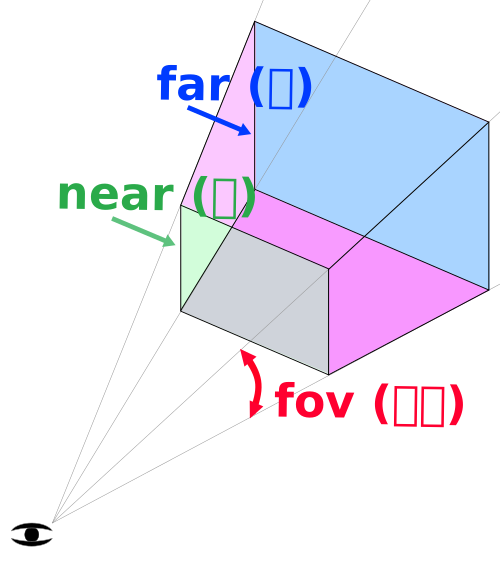
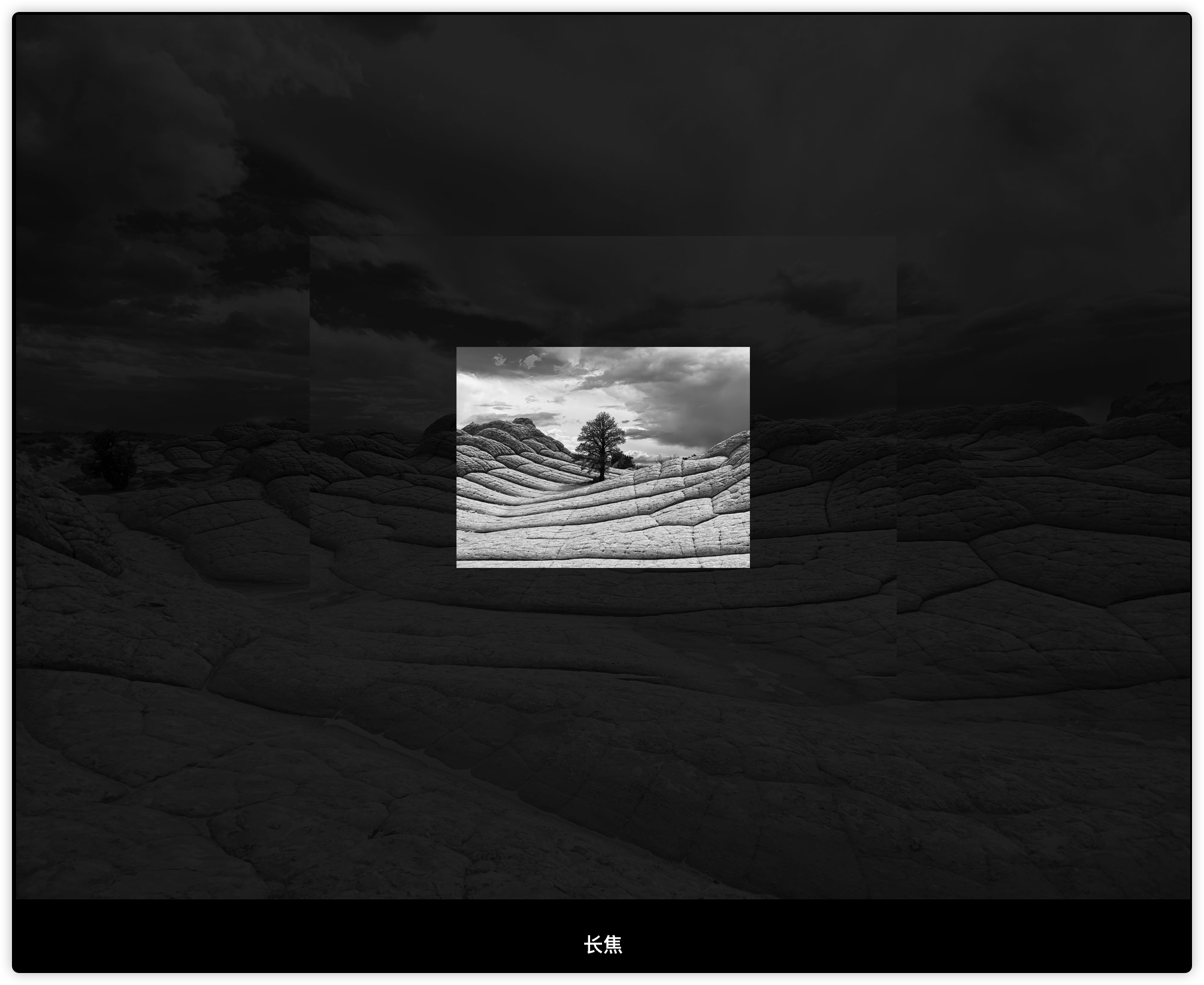
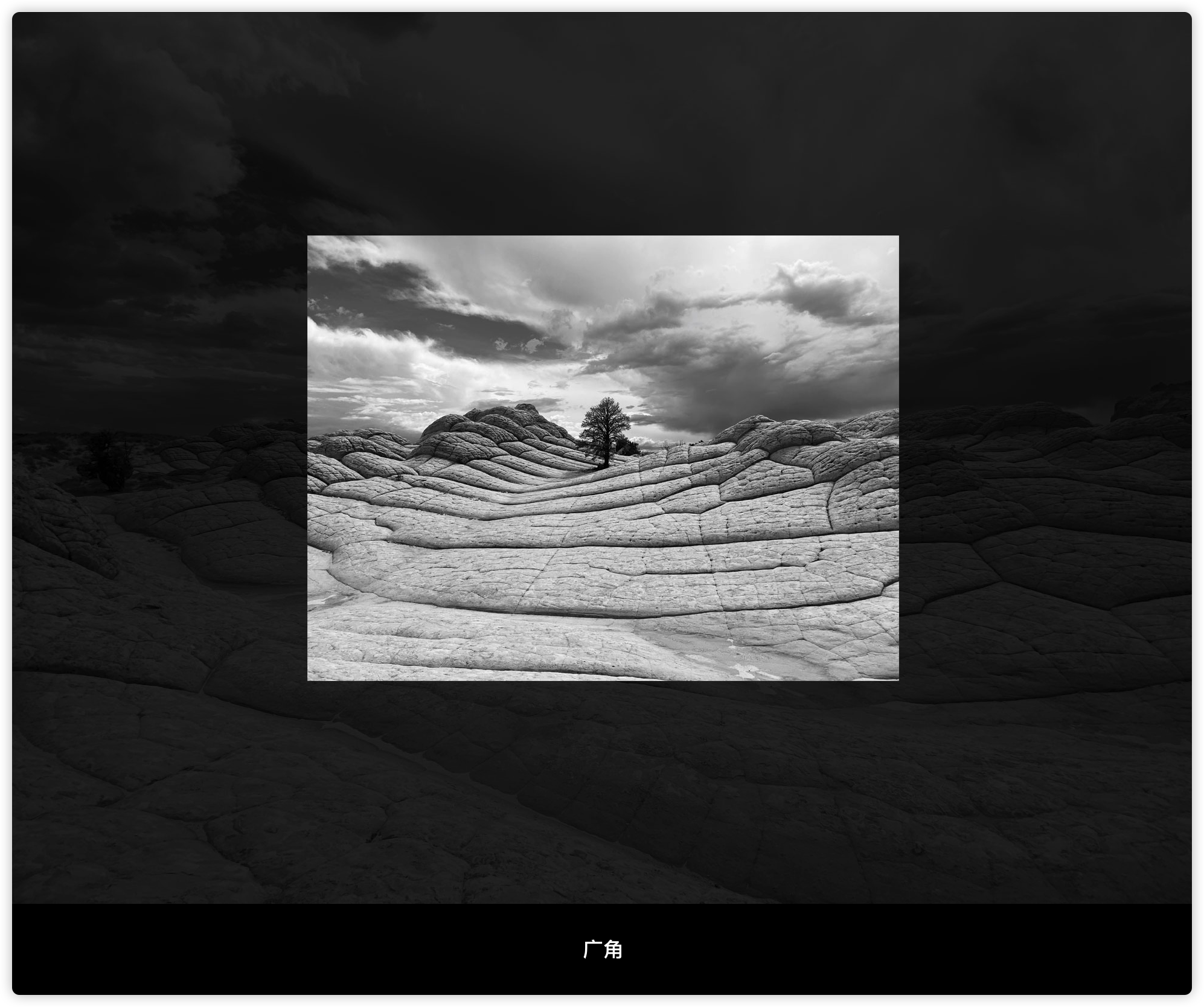
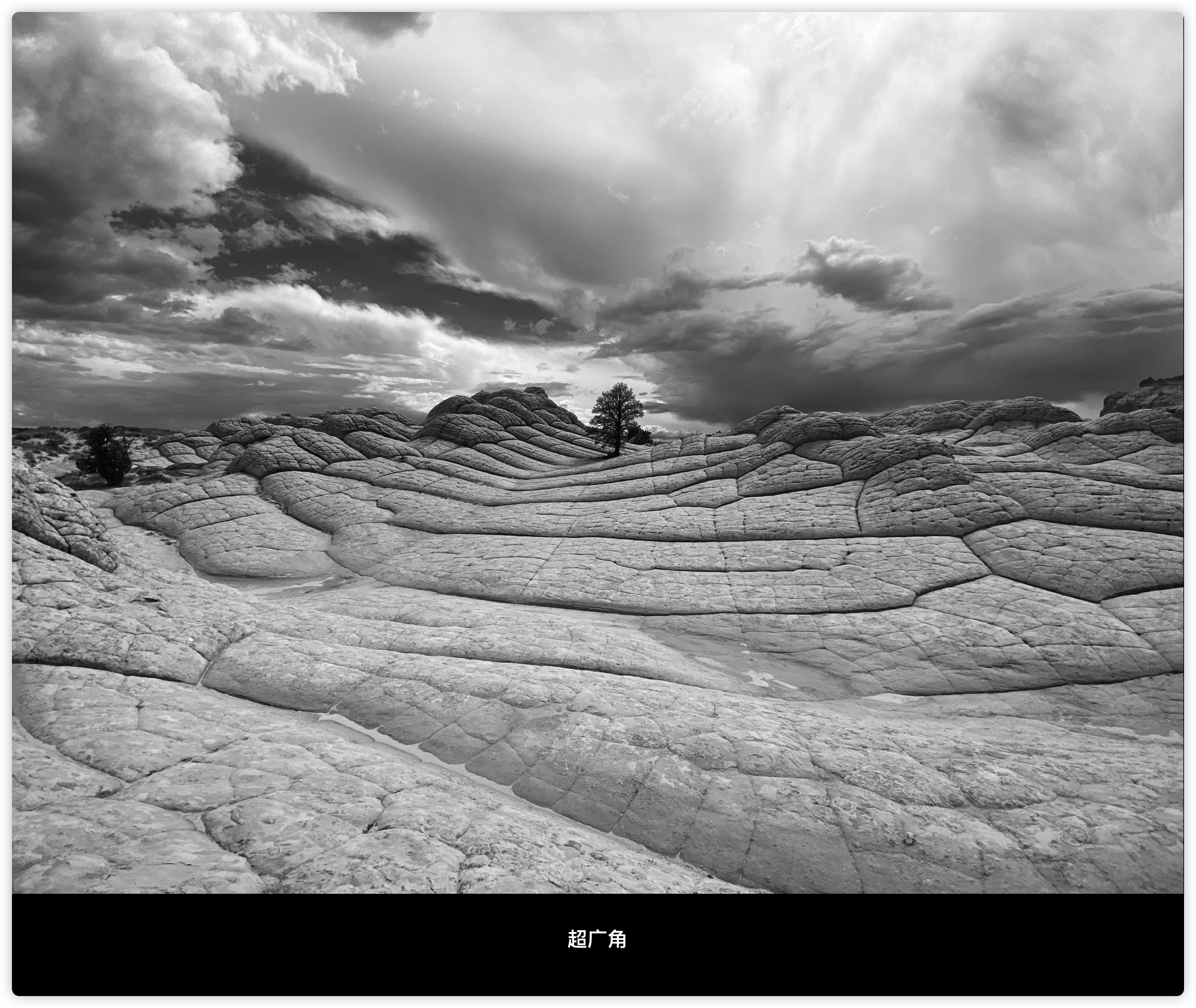
2-1 可视角度
2-2 创建透视相机
Demo2-3
const camera = new THREE.PerspectiveCamera(75, width / height, 0.01, 1000);

camera.position.set(1.5, 1.5, 3); // 相机默认的坐标是在(0,0,0);
scene.add(camera);fov (field of view 视角) 相机视锥体垂直视野角度, 也就是相机的可视角度. 比如手机上的广角镜头, 可视范围就比普通相机要大, 透视相机比较常用的是45或者75
aspect (宽高比) 相机视锥体纵横比
通常设为 Canvas 的宽高比例
near 相机视锥体近端面
不要设置过度极端的数据, 如果出现物体遮挡, 可强制GPU开启高精度计算: logarithmicDepthBuffer
far 相机视锥体远端面
2-2 使用 dat.gui 调试相机对象
Demo2-4
// npm install dat.gui

import * as dat from 'dat.gui';

const gui = new dat.GUI();

// 添加gui对象
gui.add(camera.position, 'x').min(-4).max(4).step(0.01);
gui.add(camera, 'fov').min(-4).max(100).step(1);
gui.add(camera, 'aspect').min(-4).max(4).step(0.01);
gui.add(camera, 'near').min(0.1).max(4).step(0.01);
gui.add(camera, 'far').min(1).max(200).step(1);
gui.add(camera, 'zoom').min(1).max(20).step(0.1).onChange((e) => {
  console.log(e);
  camera.updateProjectionMatrix();
  const angle = camera.getEffectiveFOV();

  console.log(angle);
});

const params = {
  color: '#1890ff',
  wireframe: false,
}

gui.add(mesh, 'visible');
gui.addColor(params, 'color').onChange((val) => {
  mesh.material.forEach((m) => {
    m.color.set(val);
  });
});
gui.add(mesh.material, 'wireframe');
/* gui.add(params, 'wireframe').onChange((val) => {
  mesh.material.forEach(m => {
    m.wireframe = val;
  });
}); */2-3 包围盒与视锥体
Demo
// 通过camera计算出视锥
const frustum = new THREE.Frustum();

this.pCamera.updateProjectionMatrix(); // 更新以保证拿到最正确的结果
frustum.setFromProjectionMatrix(
  new THREE.Matrix4().multiplyMatrices(
    this.pCamera.projectionMatrix,
    this.pCamera.matrixWorldInverse
  )
); // 得到视锥体的矩阵

const result = frustum.intersectsBox(this.mesh.geometry.boundingBox);

console.log(result); // true为相交或包含2-4 相机漫游
Demo2-5
import { HeartCurve } from 'three/examples/jsm/CurveExtras';

// 创建曲线
const curve = new HeartCurve(0.5);
const tubeGeometry = new THREE.TubeGeometry(curve, 200, 0.01, 8, true);
const basicMaterial = new THREE.MeshBasicMaterial({ color: 0x00ff00 });
const tubeMesh = new THREE.Mesh(tubeGeometry, basicMaterial);

scene.add(tubeMesh);

// 将曲线分割成3000段
const points = curve.getPoints(3000);
// 分割点计数
let count = 0;

// 更新画布
const index = count % 3000;
const point = points[index];
const nextPoint = points[index + 1 > 3000 ? 0: index + 1];

camera.position.set(point.x, point.y, point.z);
// 让人眼视角沿着路径观察
// camera.lookAt(nextPoint.x, nextPoint.y, nextPoint.z);
camera.updateProjectionMatrix();
count++;camera.position.set(point.x, 0, -point.y);
// 让人眼视角沿着路径观察
// camera.lookAt(nextPoint.x, 0, -nextPoint.y);3. 其他相机
立方体相机 CubeCamera
创建6个相机,并将拍摄的场景渲染到WebGL渲染器立方体目标(WebGLRenderTargetCube)上, 创建全景图, 类似于镜面反射效果
ArrayCamera 阵列相机
可以在1个画布上创建多个相机视角, 类似于分屏功能
StereoCamera 立体相机
可以直接渲染 VR 场景到屏幕上
4. 相机控制
内置控制器:
飞行控制器 FlyControls (模拟飞行, 比如飞机, 无人机)
点锁定控制器 PointerLockControls (模拟第1人称视角)
轨道控制器 OrbitControls (以目标为焦点的旋转缩放,同时平移相机观察场景,看上去是物体在进行变换,实际上所有的变化都是相机的相对位置在发生改变)
拖拽控制器 DragControls (可以用来拖拽模型对象, 支持dragstart, drag, dragend, hover 等等事件)
...
4-1 OrbitControls 轨道控制器
Demo2-6
import { OrbitControls } from 'three/examples/jsm/controls/OrbitControls';

const orbitControls = new OrbitControls(camera, canvas);

orbitControls.enableDamping = true; // 启用惯性效果
orbitControls.dampingFactor = 0.1; // 阻尼系数
orbitControls.enablePan = true; // 启用或禁用相机平移(Mac按住cmd生效)
orbitControls.panSpeed = 1; // 位移的速度
orbitControls.autoRotate = true; // 自动围绕目标旋转
orbitControls.autoRotateSpeed = 2; // 控制旋转速度
orbitControls.enabled = true; // 是否启用
orbitControls.enableRotate = true; // 启用相机水平或垂直旋转
orbitControls.enableZoom = true; // 启用相机缩放
orbitControls.minZoom = 0; // 限制缩放
orbitControls.maxZoom = 10; // 限制缩放
orbitControls.zoomSpeed = 2; // 缩放速度
orbitControls.minDistance = 0; // 将相机向内移动多少(仅适用于PerspectiveCamera)
orbitControls.maxDistance = 0; // 将相机向外移动多少(仅适用于PerspectiveCamera)
orbitControls.target.y = 2; // 改变初始视角的位置
// ...4-2 DragControls 拖拽控制器
Demo2-7
import { DragControls } from 'three/examples/jsm/controls/DragControls';

const dragControls = new DragControls([objects], camera, canvas);如何解决与DragControls冲突
dragControls.addEventListener('dragstart', function(e) {
  orbitControls.enabled = false;
});
dragControls.addEventListener('dragend', e => {
  orbitControls.enabled = true;
});4-3 飞行控制器 FlyControls
模拟飞行视角, 比如飞机, 无人机等
4-4. PointerLockControls 锁点控制器
常用于第1人称视角, 比如第1人称射击游戏
5. 多相机同步渲染
Demo2-8
// 创建观察场景的相机 (相机显示的内容需要和窗口显示的内容同样的比例才能够显示没有被拉伸变形的效果)
const frustumSize = 4; //设置显示相机前方高4的内容
const aspect = this.width / this.height;
const camera = new THREE.OrthographicCamera(-aspect * frustumSize, aspect * frustumSize, frustumSize, -frustumSize, 0.001, 1000); // 正交相机

// 设置相机位置
camera.position.set(1, 0.5, 2); // 相机默认的坐标是在(0,0,0);
// 设置相机方向
camera.lookAt(scene.position); // 将相机朝向场景
// 将相机添加到场景中
scene.add(camera);
this.camera = camera;

// 创建缩略图相机
const thumbnailCamera = new THREE.OrthographicCamera(-200/300 * frustumSize, 200/300 * frustumSize, frustumSize, -frustumSize, 0.001, 1000);

thumbnailCamera.position.set(1, 0.5, 2);
thumbnailCamera.lookAt(scene.position);
this.thumbnailCamera = thumbnailCamera;

render () {
  // 创建渲染器
  let renderer;

  if (!this.renderer) {
    renderer = new THREE.WebGLRenderer({
      canvas: this.canvas,
      antialias: true, // 抗锯齿
    });
  } else {
    renderer = this.renderer;
  }

  renderer.setScissorTest(true);
  // 全屏剪裁区
  const dpr = window.devicePixelRatio || 1;
  const width = this.width * dpr;
  const height = this.height * dpr;
  renderer.setScissor(0, 0, width , height);
  renderer.setViewport(0, 0, width, height);
  renderer.setClearColor(0x999999, 0.5);
  // 设置屏幕像素比
  renderer.setPixelRatio(dpr);
  // 设置渲染器大小
  renderer.setSize(this.width, this.height);
  // 执行渲染
  renderer.render(this.scene, this.camera);
  this.renderer = renderer;

  // 右下角剪裁区
  const w = this.width - 200 - 20;
  const h = this.height - 300 - 20;

  renderer.setScissor(w, h, 200, 300);
  renderer.setViewport(w, h, 200, 300);
  renderer.setClearColor(0x000000, 1);
  renderer.render(this.scene, this.thumbnailCamera);

  this.thumbnailCamera.position.copy(this.camera.position);
  this.thumbnailCamera.quaternion.copy(this.camera.quaternion);
  this.thumbnailCamera.zoom = this.camera.zoom;
  this.thumbnailCamera.updateProjectionMatrix();
},
// 更新画布
tick () {
  const _this = this;

  // update objects
  _this.orbitControls.update();
  // _this.mesh.rotation.y += 0.005;
  // 重新渲染整个场景
  _this.render();
  // 调用下次更新函数
  window.requestAnimationFrame(() => _this.tick());
},